Door knock · roofing leads from the radar
Don't buy leads.
Knock the roofs the hail hit.
Same storm, two roofers. One is on the street the morning after with every hit roof on the phone. The other is waiting on a list that every competitor already bought.
We start from the radar, so the storm is the list. Then the app runs your day: callbacks you set at the door, follow-ups due this morning, a nudge at every step to roof done.
- Every roof the hail hit
- The street on your phone
- Every job to roof done
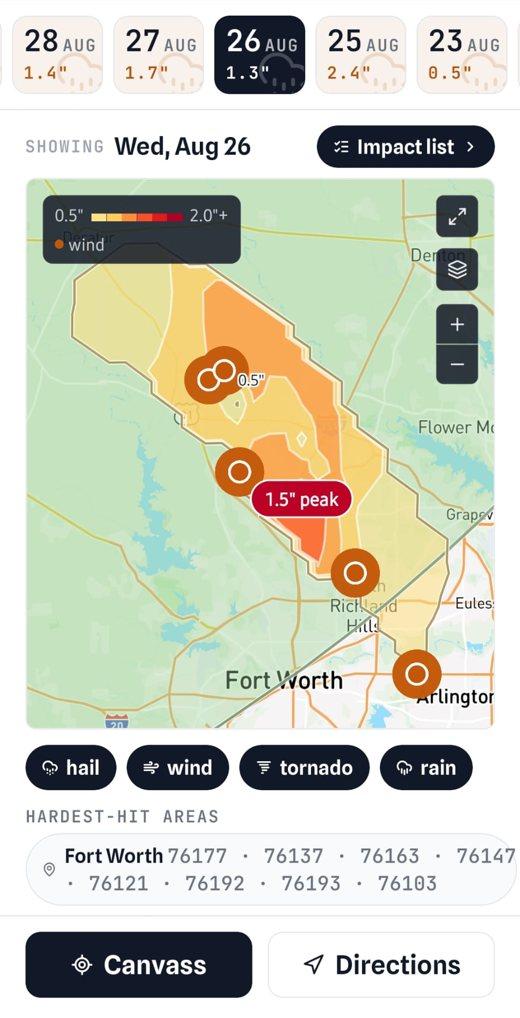
01 · the storm
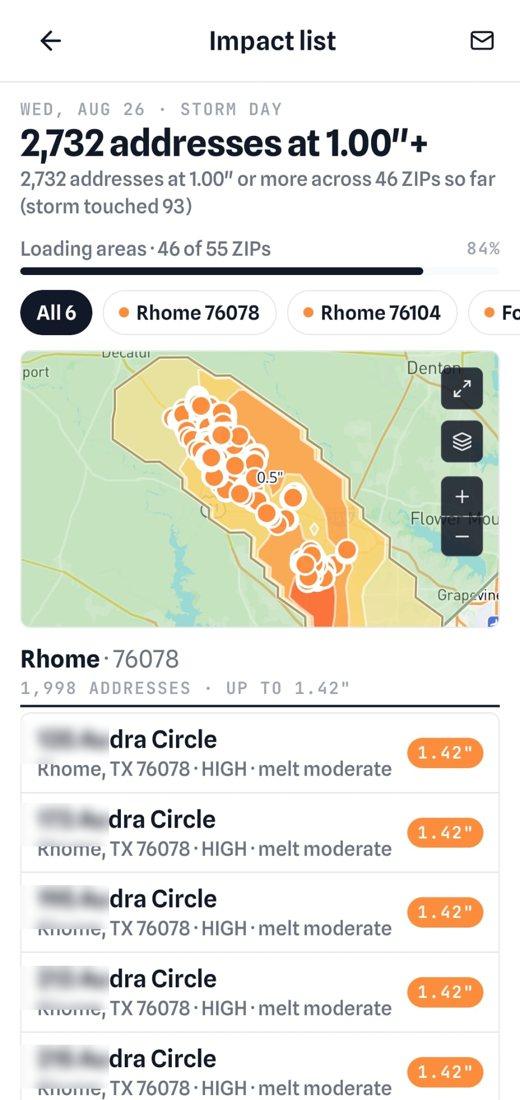
02 · every roof it hit
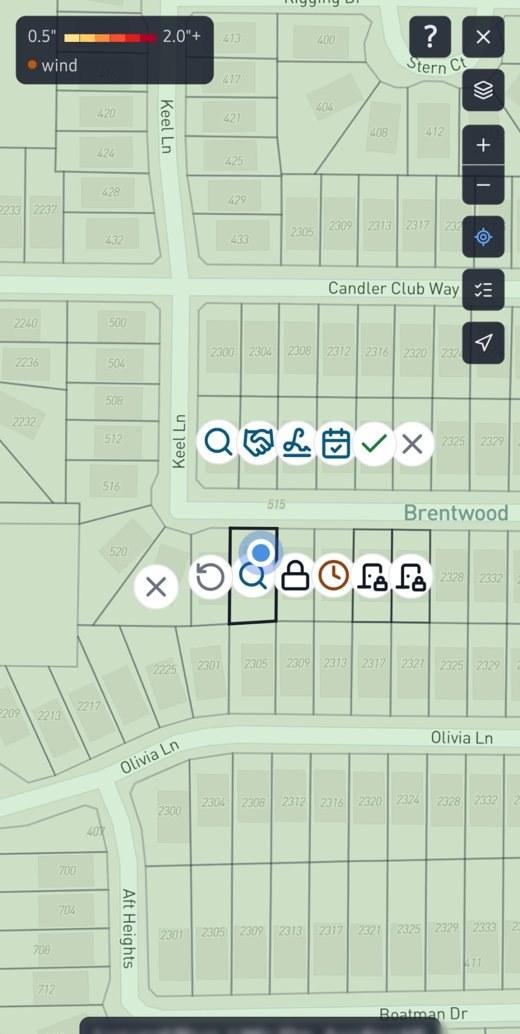
03 · the street
The loop
From the radar to roof done, in one app.
Storm maps finds the storm. Impact list names every roof it hit. Door knock works the street. The roofing CRM carries each job to the end.
The storm, the morning after
Every hail day on a map: the swath, the peak, the hardest-hit ZIPs. Pick the day, see where the damage is before anyone has printed a list.
Every roof it hit, verified
The addresses under the swath with the hail size at each roof, off the same radar as the storm report you hand an adjuster. This is the list — you already have it.
Work the street, one tap a door
The map finds the house in front of you by GPS and draws its lot lines. Tap it: not home, not interested, callback, inspect. Other crews' signed jobs show a lock, so you walk on.
Carry it to roof done
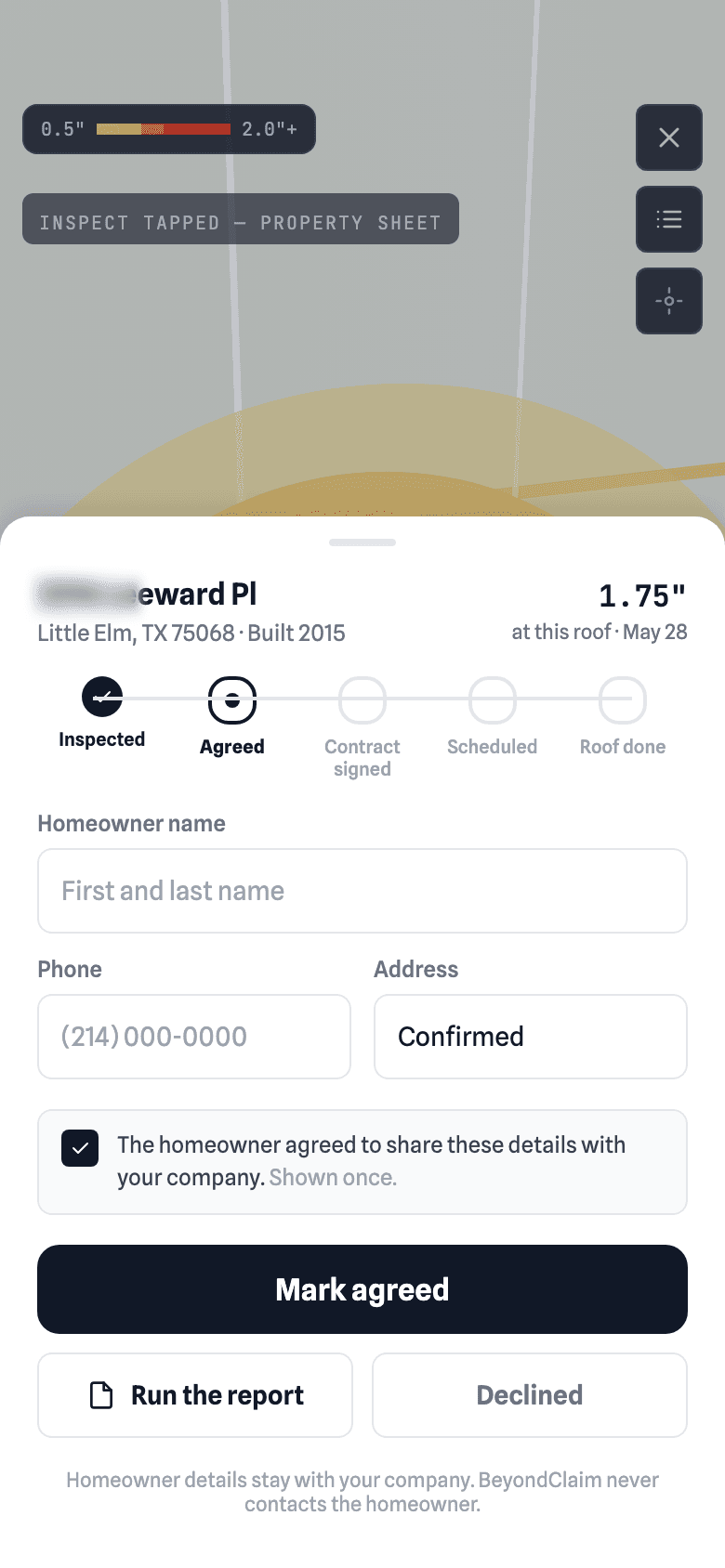
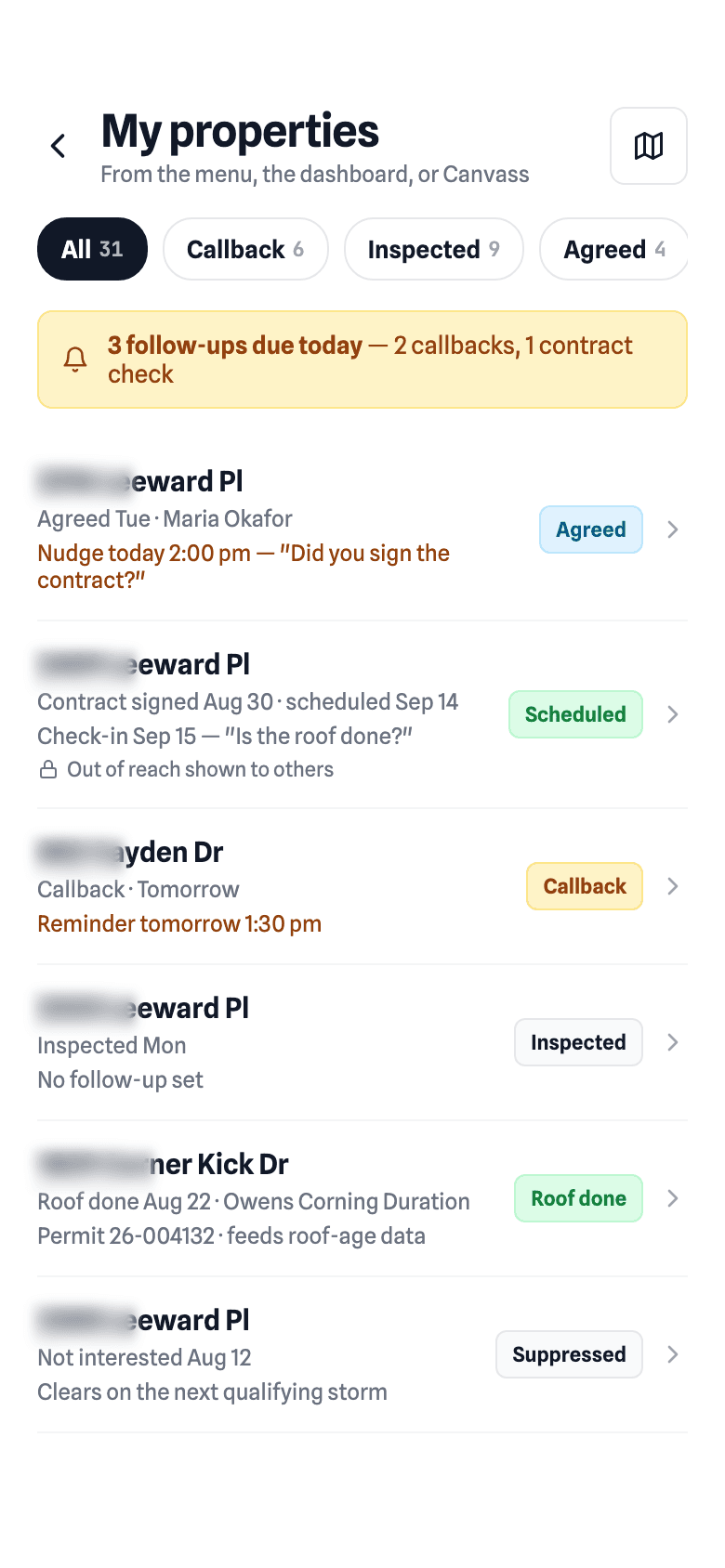
Inspect opens the property in the roofing CRM. Agreed, contract signed, scheduled, roof done, with a reminder at each step and the roof record kept for the next storm.
Three things they sell you separately
A list, a canvassing app, a CRM. None of them has the storm.
You end up paying for all three. Here's the same job four ways — ours first.
Where the houses come from
BeyondClaim
The radar. The swath on the day it fell, and every roof it hit, with the parcel outline
- Bought list
- A file assembled weeks after the storm
- Canvassing app
- Wherever you drop a pin
- Roofing CRM
- Whatever you type in
Is each house verified
BeyondClaim
Yes — peak hail size at that roof, with the date. The same evidence as the storm report you hand an adjuster
- Bought list
- No
- Canvassing app
- No
- Roofing CRM
- No
Who else has it
BeyondClaim
Your crew, live. Houses another company signed show a lock, no name
- Bought list
- Every roofer who paid
- Canvassing app
- Nobody else can see your crew
- Roofing CRM
- —
At the door
BeyondClaim
What your crew already did here, and the lot in front of you found by GPS
- Bought list
- Nothing
- Canvassing app
- Your own pins
- Roofing CRM
- —
After the knock
BeyondClaim
Inspect opens the property in the CRM; five stages to roof done, a reminder at each, the record kept
- Bought list
- A spreadsheet, if anyone keeps it
- Canvassing app
- Export it somewhere
- Roofing CRM
- Re-key it
Homeowner data
BeyondClaim
None collected to sell. What you enter at Agreed stays with your company
- Bought list
- Names and phones, resold
- Canvassing app
- Yours to manage
- Roofing CRM
- Yours to manage
What it costs each storm
BeyondClaim
Included in Pro, $29.99 a month. No per-lead fee, no list
- Bought list
- The list again
- Canvassing app
- Per seat, plus the list
- Roofing CRM
- Per seat, plus the list
| Compared on | BeyondClaim | Bought list | Canvassing app | Roofing CRM |
|---|---|---|---|---|
| Where the houses come from | The radar. The swath on the day it fell, and every roof it hit, with the parcel outline | A file assembled weeks after the storm | Wherever you drop a pin | Whatever you type in |
| Is each house verified | Yes — peak hail size at that roof, with the date. The same evidence as the storm report you hand an adjuster | No | No | No |
| Who else has it | Your crew, live. Houses another company signed show a lock, no name | Every roofer who paid | Nobody else can see your crew | — |
| At the door | What your crew already did here, and the lot in front of you found by GPS | Nothing | Your own pins | — |
| After the knock | Inspect opens the property in the CRM; five stages to roof done, a reminder at each, the record kept | A spreadsheet, if anyone keeps it | Export it somewhere | Re-key it |
| Homeowner data | None collected to sell. What you enter at Agreed stays with your company | Names and phones, resold | Yours to manage | Yours to manage |
| What it costs each storm | Included in Pro, $29.99 a month. No per-lead fee, no list | The list again | Per seat, plus the list | Per seat, plus the list |
What starting from the radar gets you
Four things a bought list can't do.
Hail size on every lot
The parcel outline for every house in the state, with the peak hail at that roof. Not a ZIP, not a circle — the lot.
Crews stop stepping on each other
A house under contract shows a lock to every company, with no name attached. The more crews on the app, the fewer wasted afternoons for all of them.
A no stays a no, everywhere
Do not knock is the homeowner's wish, so every company sees it. Capped and time-limited so nobody can abuse it.
A roof record no list guy has
Roof done keeps the shingle, the date and the permit. Next storm, a fresh roof shows as fresh — for you, and as an anonymous mark for everyone else.
Not just the storm
It runs the day after, and the season after that.
A storm tool you open twice a year is a report. This one is where a crew starts every morning: what is due, who to call back, which roof is next.
Follow-ups due today
The dashboard opens on what is due: callbacks you set at the door, the homeowner who said Saturday, the contract that has not turned into a date.
One reminder, at the right time
Agreed but no contract after a day. Signed but no roof date. Scheduled and the day has passed — is it done? Each nudge is one tap to answer, from the notification.
The alert that starts the loop
A live storm alert for your watched ZIPs lands in minutes, with the impact list behind it. The day starts on the map, not on the phone with a list vendor.
The record that outlasts the storm
Shingle, date, permit — kept. Next season the house shows as recently re-roofed for you, and as an anonymous mark for everyone else.
What the map says
An icon on the lot, not a color to remember.
Eight of these are yours only. Two are shared with every company on purpose: a homeowner who asked never again, and a house another company has under contract. Both are anonymous, so crews stop wasting each other's afternoons without anyone sharing a customer.
- Not homeYour company
- Not interestedYour company
- CallbackYour company
- InspectedYour company
- AgreedYour company
- Contract signedYour company
- ScheduledYour company
- Roof doneYour company
- Do not knockEveryone
- Another company's signed jobEveryone
FAQ
Roofing leads, answered.
Where do roofing leads come from after a hailstorm?
From the radar. Storm maps shows every hail day and its swath; Impact list names every roof under it with the hail size at that address. That is the same evidence as the storm report you hand an adjuster, and it's on your phone the morning after, before anyone has put a list together.
Should I buy hail damage leads or property leads?
You don't need to. A bought address list is weeks old and every roofer in the market got the same file. Door knock is included in Pro and Team with no per-lead fee: the houses the storm hit, the lot in front of you found by GPS, and what your crew already did at each door.
Does BeyondClaim sell homeowner data or leads?
No. We never collect homeowner names, phones or mailing addresses to sell. What your crew enters at Agreed stays with your company.
Is Door knock a roofing CRM?
Yes, for the part that matters in the field. Inspect opens the property; Agreed, Contract signed, Scheduled and Roof done follow, with a reminder at each stage and the roof record kept for the next storm. Follow-ups due today are on the dashboard every morning.
Can other roofing companies see my customers?
No. Only two marks are shared across companies, and both are anonymous: a homeowner's Do not knock, and a house another company has under contract, shown as a lock with no name.
Where does Door knock work?
Texas today, statewide, with the lot lines for every property. Every state we add is included at the same rate, for as long as you stay subscribed.
Pro is $29.99 a month. The list comes with it.
Door knock, the impact list and the roofing CRM are all in Pro; Team is $99 for five seats. No per-lead fee, no list to buy each storm. Texas today, and every state we add is at the same rate for as long as you stay subscribed.